ip
WannaBeSkynet User Guide
Introduction
🤖 WannaBeSkynet - Get your tasks efficiently managed by a (wannabe) sentient AI bot.
“Your data is safe with me, I definitely won’t use it at all.” - WannaBeSkynet
Tired of the mortal struggle of remembering tasks? WannaBeSkynet is here to offload your memory onto silicon. This bot is a task manager that will help you keep track of your to-dos with a dash of humorously offensive charm.
Get started in 3 simple steps
- Download the jar: Click here to download WannaBeSkynet.
- Launch: Execute the jar file to awaken the bot.
java -jar bot.jar- You need to have Java installed on your machine to run the bot.
- The bot will create a
datafolder in the same directory as the jar file to store your tasks.
- Happy Tasking: Start adding tasks and managing them with the bot.
Features
Bot commands are case-insensitive, so don’t worry about getting the capitalization right. Along with this, the bot supports friendly syntax, that is, shorthand commands - so you can type l instead of list and m instead of mark.
You can also work across multiple Operating Systems, as the bot is designed to be cross-platform compatible. The only requirement is that you have Java installed on your machine.
Besides that, this bot is designed to be user-friendly It will respond to your commands with a touch of personality.
Here’s a list of commands you can use to interact with the bot:
1. Adding Tasks of multiple types
This bot supports three types of tasks: To-Do, Deadline, and Event.
To-Do Task
- Use:
todo <task_name>ort <task_name> - Example:
todo buy groceries
Deadline Task
- Use:
deadlineord <task_name> /by <time> - Example:
d Steal moon by July 20 2029 20:00 - Note: The time must be in the format
MMM dd yyyy HH:mm(e.g.Jul 20 2029 20:00)
Event Task
- Use:
eventore <event_name> /from <time1> /to <time2> - Example:
e attend meetings /from Aug 13 2029 10:00 /to Aug 13 2029 23:00 - Note: The time must be in the format
MMM dd yyyy HH:mm(e.g.Aug 13 2029 10:00)
2. Viewing and searching Tasks
Listing all Tasks
To view the grand list of your tasks:
- Use:
listorl - This would include all your tasks, marked or unmarked.
Find Tasks
To search for tasks containing a specific keyword:
- Use:
findorf <keyword> - Example:
f something - This is case-insensitive.
3. Managing Tasks
Mark Task as Done
- Use:
markorm <task_number> - Example:
m 1
Unmark Task as Done
- Use:
unmarkorum <task_number> - Example:
um 5
Delete Task
- Use:
deleteordel <task_number> - Example:
del 3
4. Exiting the Program
- Use:
exit,quit, orq - Example:
quit
5. Forgot a command?
Type help or h for a quick and short overview of the commands.
Alternatively, visit this guide again for a refresher.
What it looks like
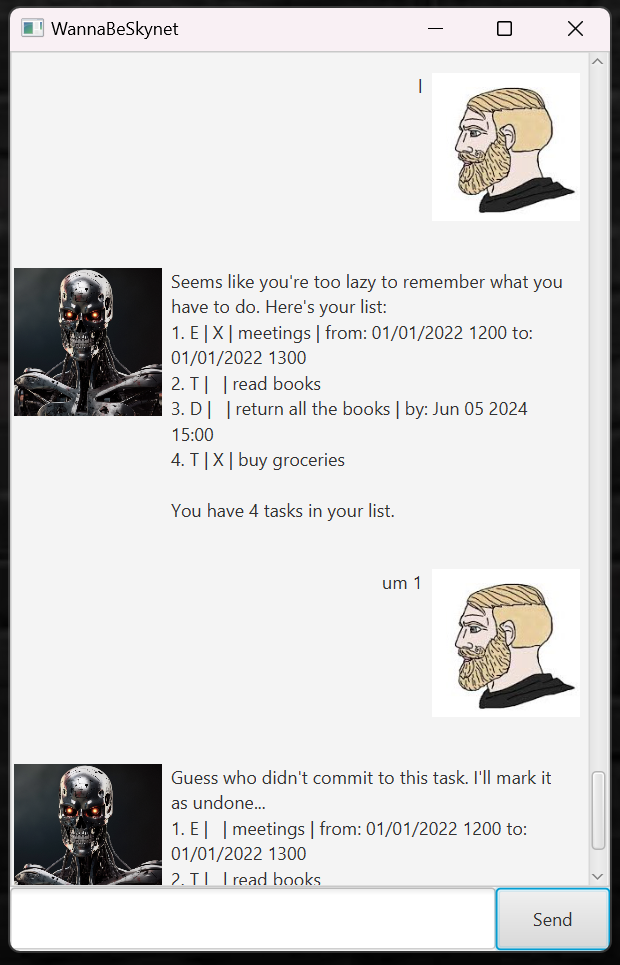
Here’s a screenshot of the UI: